Selecting the right approach
Integration approaches overview
IntelliProve's products are designed to support different needs — from teams that want to launch quickly with a ready-made solution, to teams that need full flexibility over how face scans and health insights show up in their platform.
There is no single "correct" approach to integrate. The right choice depends on how much of the experience you want to own, and how tightly the results need to fit into your existing user journeys.
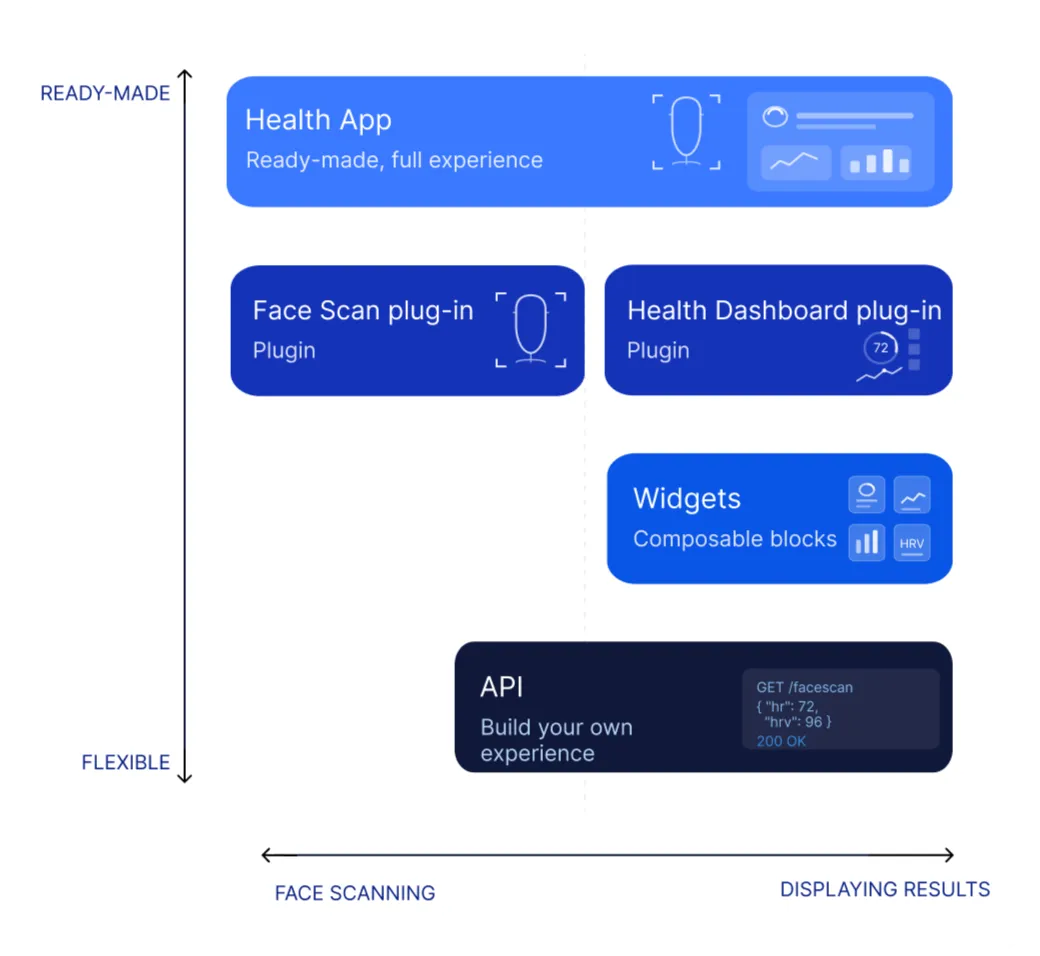
At a glance: The image above maps each product along two axes: how ready-made vs. flexible the integration is (vertical), and whether it covers the face scanning side or the displaying-results side (horizontal).
Three main ways
There are three main ways to integrate IntelliProve. Each one is a complete, working setup — and within each approach you can mix and match components to fit your use case.
For most customers, we recommend starting with the two Plug-in components or the Face Scan plug-in + Widgets / API route. The Health App is a great fit for smaller deployments, pilots, or use cases where you don't need IntelliProve to be part of your core product — but it comes with trade-offs (see below) that are worth understanding before you choose it.
1. Face Scan plug-in + Health Dashboard plug-in
This approach combines the Face Scan plug-in with the Health Dashboard plug-in. Both are embeddable web components that drop into your existing web platform or app with a few lines of code.
You handle the surrounding flow — when the scan happens, where the dashboard appears, how users navigate between them — but the scan UX and the results view itself are still ready-made.
Use this when you want to:
- Keep the face scan and dashboard inside your own platform's navigation and authentication
- Place the scan in one part of your journey (e.g. onboarding) and the dashboard in another (e.g. a profile tab)
- Pass your own user IDs so health data is linked to your user's accounts, across devices and sessions
- Customise look and feel beyond what the Health App allows, without building the scan or dashboard from scratch
2. Face Scan plug-in + Widgets/API
You use the Face Scan plug-in to perform the actual measurement (this part isn't something you'd want to rebuild — quality checks, lighting feedback, and the smart question flow are baked in). But instead of using a ready-made dashboard, you build your own presentation layer using:
- IntelliWidgets — small, prebuilt UI tiles for biomarkers, metrics, recommendations, to-dos, and the main wellbeing summary. Place them anywhere on your platform.
- The REST API — request the raw health data directly and render it however you want.
Because you're working with the underlying data, health insights can live wherever they make sense — embedded in your own UI components, woven into existing user flows, surfaced in email campaigns or push notifications, or exported into reports. You decide.
Use this when you want to:
- Match the results view exactly to your platform's design system
- Trigger workflows based on health data (e.g. send a follow-up email if a wellbeing score drops)
- Combine IntelliProve insights with your own data in custom dashboards
- Keep a single source of truth for content, recommendations, and follow-up actions
- Build experiences that don't fit the standard "scan → dashboard" pattern
3. Health App — the ready-made route
The Health App is a complete web application that bundles the face scan, results page, recommendations, and trends over time into a single user experience. You get a personalised link (for example, https://<your-company>.health.intelliprove.com) that you can drop into an email campaign, place behind a button on your website, or embed in your platform via iframe.
It's the fastest way to get a working IntelliProve experience in front of users — no integration work, no design decisions, just a ready-made flow.
Use this when you want to:
- Launch in minutes, not weeks
- Validate a use case before investing in a deeper integration
- Run a small deployment, pilot, or internal use case
- Avoid managing separate plug-ins or API calls
You can still customise colours, fonts, branding, and the recommendations shown — all through the admin tool. No development work required.
What to keep in mind:
The Health App is a separate surface that lives next to your product, not inside it. That has a few practical consequences:
- No deep integration with your platform. Users move between two environments — yours and IntelliProve's.
- Limited flexibility. The Health App's structure is fixed. If you wish to integrate Face Scans in various places in your platform and present results based on an opinionated design system or specific UX patterns, the Health App might not be for you.
If any of these matter for your use case, the plug-in components or the Face Scan plug-in + Widgets / API route will serve you better.
How they compare
| Face Scan plug-in + Widgets / API | Plug-in components | Health App |
|---|---|---|---|
What's ready-made | Scan UX and complete widgets | Scan UX and dashboard view as plug-in components | Full experience: scan + dashboard in one application |
What you build | The entire results presentation, using our widget toolbox | The flow around the plug-ins | Nothing — or just embed via iframe and build the page around it. |
Time to set up | Days, depending on scope | Hours | Minutes |
UI flexibility | Full — you control every pixel of the results | Branding + flexibility in flow placement | Branding, colours, fonts, sections only |
Lives inside your platform | Yes, fully native | Yes, embedded | Separate surface or embedded iframe, but less integrated feel. |
Use data in email, automations, custom dashboards | Yes | Yes | No |
User identification | You pass your own user ID | You pass your own user ID | IntelliProve creates a user ID, stored in browser local storage |
Cross-device history | Yes, via your user ID | Yes, via your user ID | Per browser session only. |
Best for | Custom dashboards, automated flows, email campaigns, deep platform integration | Embedded health journeys inside an existing platform | Quick launch, pilots, small deployments, no-code use |
Mixing approaches
These three approaches aren't mutually exclusive. A common pattern: start with plug-in components for the core experience, then layer in widgets and API calls for the parts of your product where health data needs to flow into custom UI, emails, or automations.
You can also combine components within a single integration. For example: use the Face Scan plug-in to capture data, the Health Dashboard plug-in for the main results page, and individual widgets to surface the user's wellbeing score on your home screen.
The Health App can also act as a stepping stone — useful for validating a use case with real users before moving to a deeper integration once you know which parts of your platform should host the scan and dashboard.
Bottom line
- Face Scan plug-in + Widgets / API if you need full control over how results are presented, or want health data to flow into your own UI, automations, or campaigns.
- Plug-in components if you want the scan and dashboard inside your platform but don't want to build them from scratch.
- Health App if you need to launch fast, are running a pilot, or have a smaller deployment where deep platform integration isn't required.
Not sure which fits? The team is happy to walk through your use case — reach out and we'll help you map it out.