Changelog
02/06/26
⚡️ Improved Face Scan plug-in performance ⚡️
- Smoother interface on lower-end devices We have optimized how the scan interface updates during the measurement. Previously, parts of the interface were recalculating alongside the live camera stream, at 30FPS, which could put extra pressure on some devices. This has now been improved, resulting in a smoother experience and reducing issues such as a lagging face frame or short visual glitches on lower-end devices.
- Optimizations for devices with limited memory For devices with less available memory, we now disable certain non-essential components during scan startup. This gives those devices more breathing room and should reduce the likelihood of memory-related issues. That said, very low-end or older devices may still experience limitations. If a device does not have enough processing power (see Device Requirements), the user may still notice a slower or laggy interface. If the device has too little available memory, the browser or app may still refresh or close unexpectedly. However, this release should improve the experience for a broader range of devices.
30/06/26
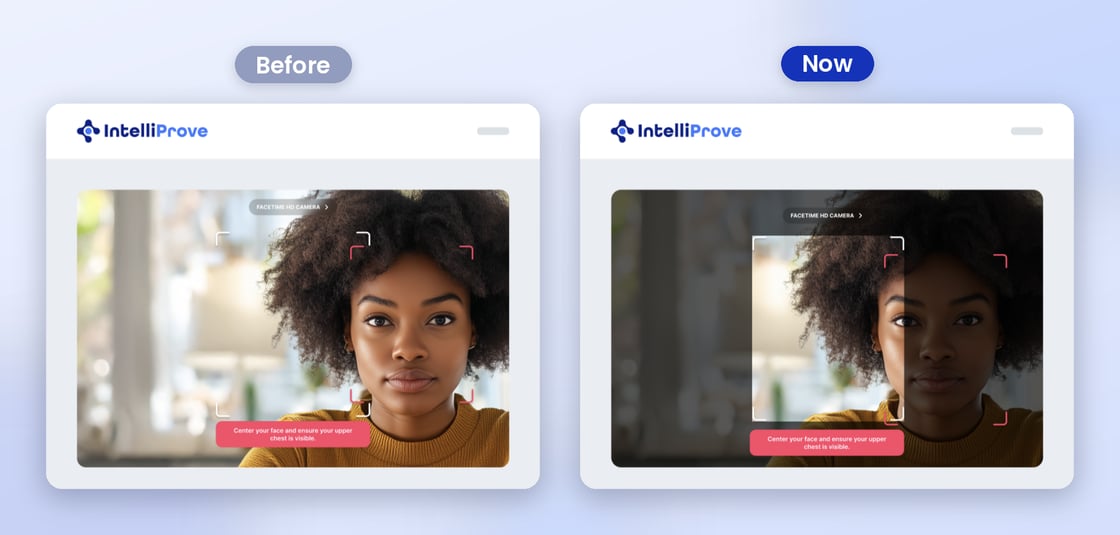
⚡️Improved face positioning guidance ⚡️
Good positioning is essential for a high-quality Face Scan. We’ve made it more intuitive for users to find the right spot by dimming the area outside the face box with a dark frame. This naturally guides users to centre their face correctly, making the scan experience smoother and more reliable.
 |
|---|
17/06/26
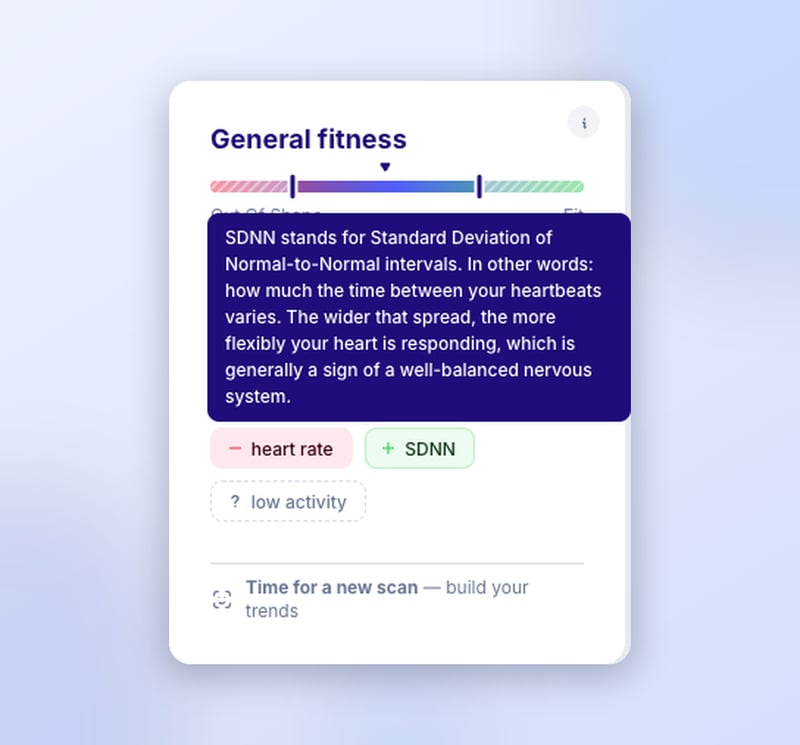
✨ Tooltips that help explain your measurement ✨
Hover over a term like SDNN and your users now get a proper explanation of what it means and why it matters. Health data only becomes meaningful when people understand what they're looking at, so we've added context throughout the widgets and health dashboard.
25/05/26
⚡️ Improved Face Scan plug-in performance ⚡️
We've shipped a set of performance improvements to the Face Scan plug-in that reduce its memory footprint and make the scan pipeline leaner across the board.
What's new
- Leaner resource footprint: the plug-in now reserves CPU and memory only during the measurement itself — not during pre-scan checks, and not after the scan ends. This reduces the memory and CPU footprint by up to 15%.
- On lower-end devices that sit slightly below our published baseline requirements and previously couldn't complete the Face Scan, this means that many of them are now able to complete the Face Scan successfully.
- The same update also enables a much cleaner failure mode with a clear message to the end user, indicating the device doesn't meet the minimum requirements for a Face Scan.
A note on very low-end devices
On devices that sit well below our published baseline requirements , the operating system may still kill the host app before the new modal can appear, due to overall memory pressure from the camera, host app, and scan pipeline combined. For the most reliable experience, we still recommend gating the Face Scan against our minimum supported spec.
15/04/26
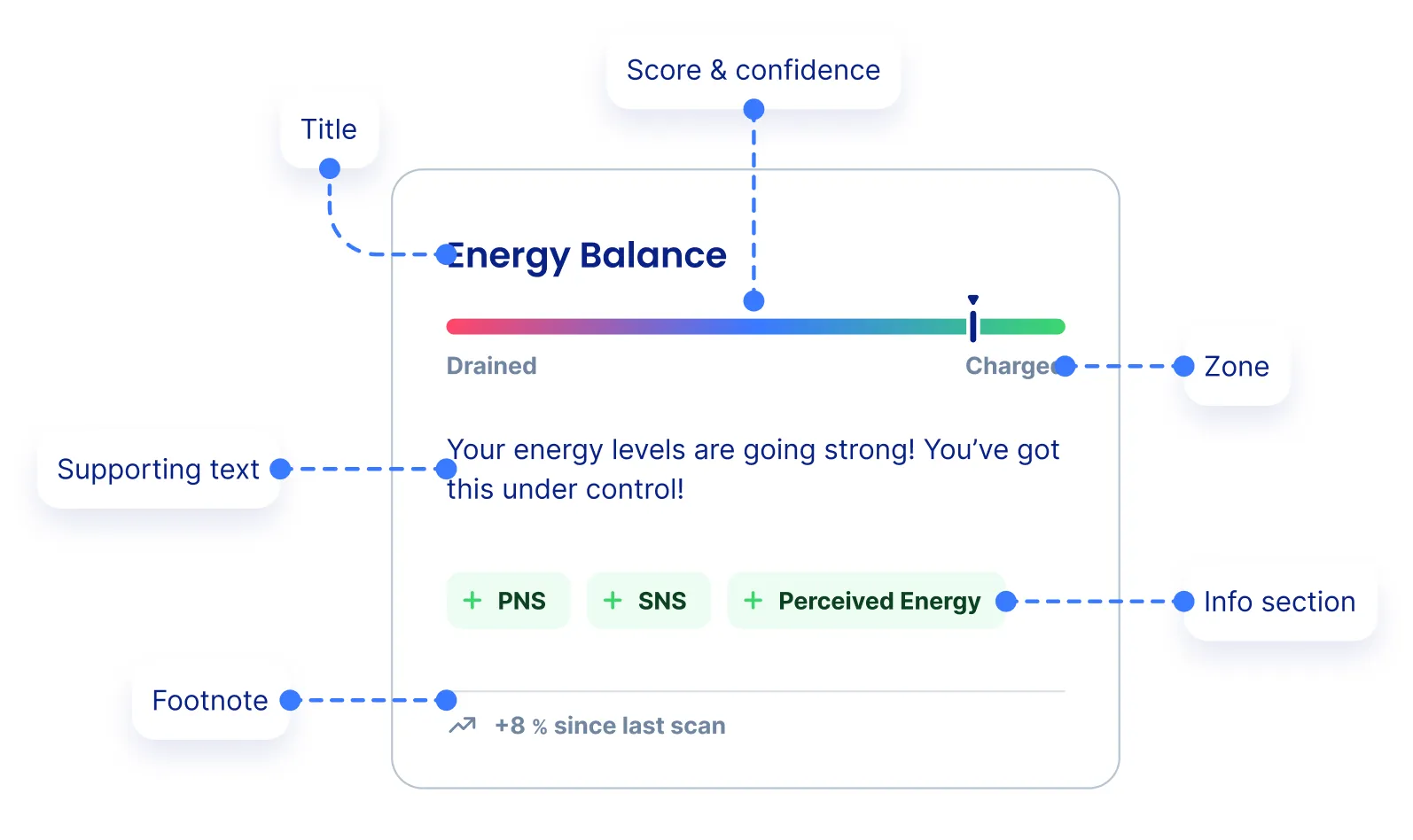
✨ New: V3 widgets based on webcomponents ✨
More flexibility, more customizability! Read all about it in our updated IntelliWidgets documentation.
13/02/2026
✨ New: Recommendations API Endpoint ✨
We have introduced a new endpoint in our REST API (v2) that allows you to programmatically request tailored health recommendations. While previously available primarily via our Recommendation Widgets, you can now fetch raw recommendation data directly to:
- Hyper-personalize the user journey: Use our health engine's logic to suggest specific content, exercises, or follow-up actions within your own UI.
- Power notification systems: Trigger automated emails or push notifications based on a user's latest health insights and biomarkers.
- Custom Dashboards & reports: Seamlessly integrate actionable health tips into your own native dashboard views without using pre-built widgets.
For technical details on request parameters and response structures, please refer to the updated Rest API documentation.
10/02/26
✨ New feature: imperial units support ✨
We’ve introduced Localization for Unit Systems, allowing you to display health data in the format your users are most comfortable with. Whether your audience prefers Metric (kg, cm) or Imperial (lbs, ft/in), IntelliProve now handles the conversion seamlessly.
🛠️ How it Works
To maintain data integrity and consistency across our API, all data remains stored in the Metric system on our backend. However, you can now toggle the display output based on your specific needs.
- Global Preference: You can set a default unit system for your entire account.
- User-Level Preference: For more granular control, you can define the unit system for individual users.
05/02/26
⚡️Improvement: enhanced inactivity handling ⚡️
We’ve updated the Face Scan plug-in to better manage idle sessions, providing a smoother experience for end-users and more control for developers.
What’s new:
- Automatic Timeout Detection: If a user remains inactive for more than 2 minutes, a notification modal will now automatically appear.
- New Event Trigger: The plug-in now emits a timeout postMessage when this threshold is reached.
- Developer Control: This allows you to programmatically redirect users, close the session, or trigger custom logic when a scan stalls.
💡 You can find implementation details and payload structures in our Message events documentation.

20/01/26
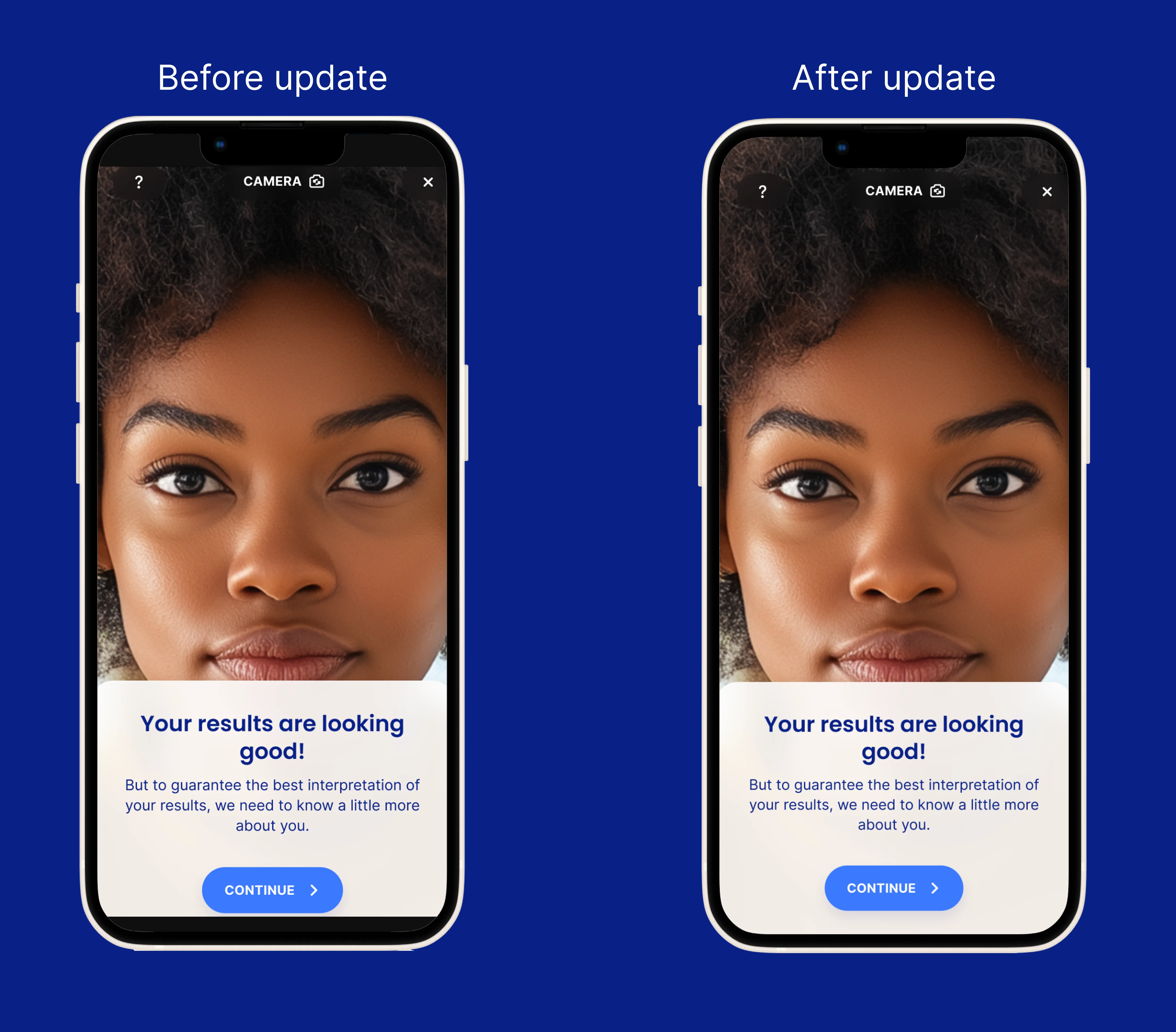
⚡️Improvement: Face Scan plug-in responsiveness ⚡️
The mobile SDKs and the Face Scan plug-in have been updated to handle device safe areas more accurately.
Previously, the Face Scan plug-in did not expand into safe areas (for example, stopping below the notch at the top and above the home indicator at the bottom), which could result in black bars at the top and bottom of the screen.
This update introduces two improvements:
- The web view now expands to fullscreen, also expanding over the safe areas
- The web plugin margins account for the safe areas so that no buttons are in the safe area
To benefit from these improvements, make sure to update to the latest version if you're using any of our mobile SDKs!
12/01/26
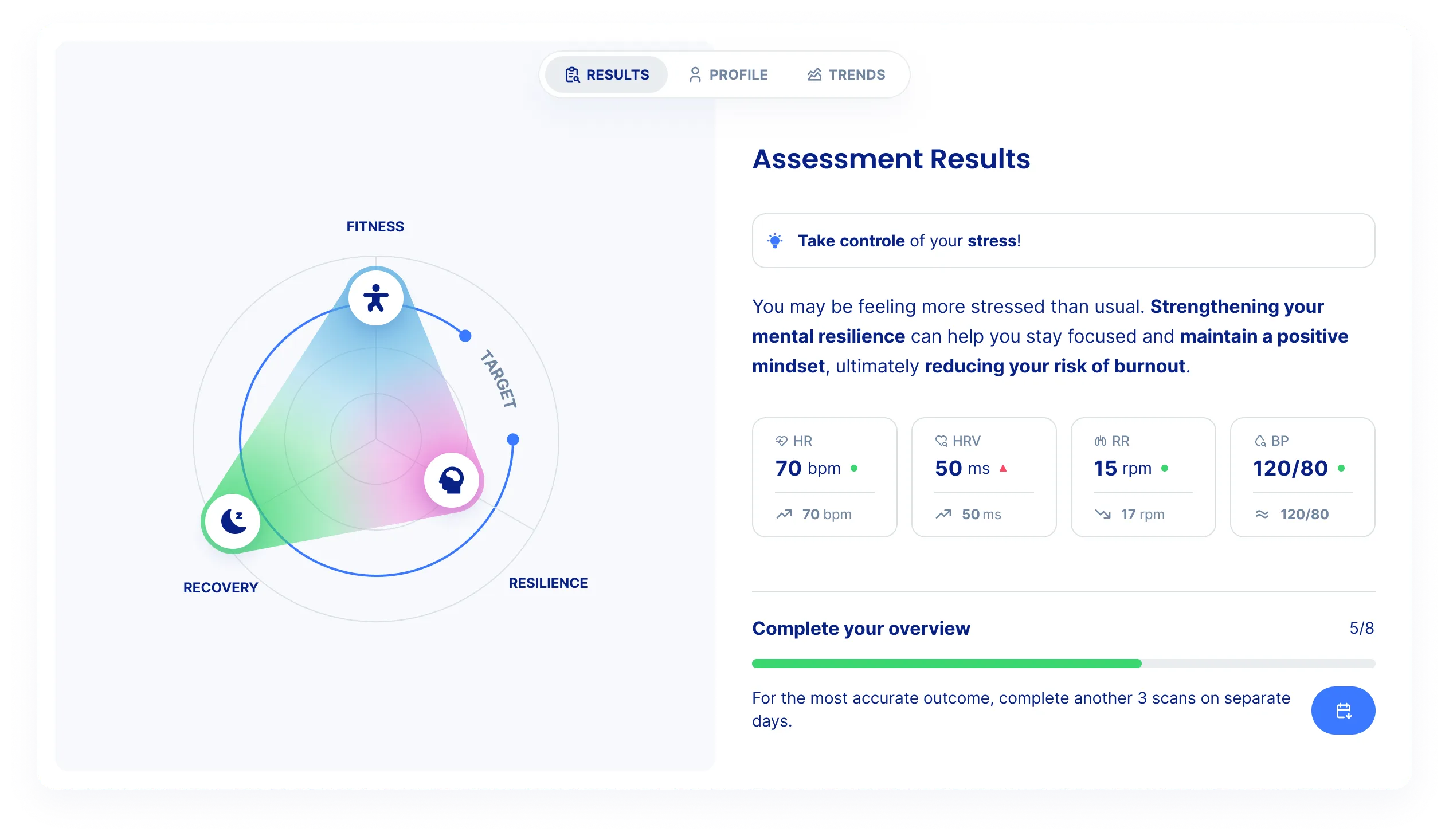
✨ New product: Main widget ✨
The Main Widget now offers a more complete and self-contained wellbeing experience. This update evolves the widget into a compact, app-like interface, with a clearer structure and improved visual hierarchy. Furthermore, this is the first widget to be released as a web component.
- The three health topics have been renamed to become to better reflect the underlying parameters:
- Physical -> Fitness
- Mental -> Resilience
- Energy & Sleep -> Recovery
- The three topics are now visualised more intuitively in the wellbeing circle. To drive motivation, a clear target line shows how users compare to a healthy baseline.
- Biomarkers of the user's last measurement are now also shown in the main widget, and include an indication of how the value evolved compared to the previous measurement.
- The new Profile tab allows the user to easily see and edit their details.
- The new Trends tab shows historical data, helping users to understand long-term patterns and motivating them towards a postive evolution.
13/11/25
✨ New features ✨
- New API endpoint You can now retrieve a user’s health metrics — including their scores and corresponding confidence values — through a new API endpoint: Get Health Metrics.

- New widget: Todo Widget A new Todo Widget is available, allowing you to present users with seasonal health tasks or reminders, tailored to their individual health profile. Powered by IntelliProve's health engine.

24/10/25
✨ New features ✨
- New event notifying you of user's camera status: Camera message events. This allows you to correctly handle situations where the user does not have a camera, or has a camera but denies access.
07/07/25
🚀 Updated Health Insights released 🚀
- IntelliProve Health Insights have received a major update. The version has been been updated to v2.0. Corresponding documentation can be found on our Health Insights page.
- What's new?
- New widgets. Eeach biomarker and metric now has a brand-new widget, including more context and interpretation of the measured value. The value is now also accompanied by a confidence value. Check out the widgets product newsletter for more information. To start using the new widgets, check out the Widgets v2 documentation.
- User details and inputs. The updated health insights take into account details about the user, such as sex and age, which allows a more accurate baseline profile for each user. Some details are also essential for calculating certain metrics, such as hypertension risk. User Input is requested after Face Scans complete. Alternatively, these details can also be provided through our API.
- Blood pressure has now been released as a biomarker. This initial release is temporarily available to all our customers, so you can explore its potential and evaluate the value of this biomarker in your context.
🚀 Health Dashboard released 🚀 The new health dashboard brings together all IntelliProve Health Insights and other widgets in one clear, plug-and-play dashboard for end-users. Integrate it with just a few lines of code, just like our Face Scan plug-in. Check out the Health Dashboard product newsletter for more information. To start using the new health dashboard, refer to the Health Dashboard plug-in page.
🚀 Recommendations engine released 🚀
IntelliProve's recommendations engine allows you to offer valuable, personalized content and services to your users based on their individual health profile. Recommendations can be easily embedded into your platform using our recommendation widget. Find out more here.
30/06/25
✨ New features ✨
- New API endpoint: Get the biomarkers from multiple Face Scans, specified by date range and count: Get multiple Face Scan Biomarkers
16/06/25
⚠️ Deprecations ⚠️
- The UserFinished and FaceScanSuccessful post messages are being deprecated. These messages are always accompanied by a dismiss message. To simplify the workflow, the dismiss message now contains an boolean attribute hasResults, omitting the need for the two additional messages. Refer to Message events for more information.
20/05/25
⚠️ Deprecations ⚠️
- The API endpoint v2/userprofiles/physical is being deprecated. Use the the new question endpoint to save user details like height, weight and smoking: /v2/questions/answer
06/05/25
✨ New features ✨
- New API endpoints supporting the questions functionality: /v2/questions. Refer to the Rest API documentation for more info.
- Added a timestamp field to the response of the graph data endpoint: v2/widgets/graph. This is the time in ISO format, helping you to more easily parse the data.
06/03/25
✨ New features ✨
- New API endpoint to get the latest face Scan(s) of a ser: Get latest Face Scan Biomarkers
14/01/25
✨ New features and fixes ✨
- API
- Updating an existing user is no longer a full replacement. Endpoint: update existing user
- New API endpoint to request wellbeing scores: get wellbeing scores
- Plug-in:
- Deprecation of post message results . Renamed to FaceScanSuccessfull. See Message events for more information. The message is still being sent for backwards compatibility, but customers are adviced to use the FaceScanSuccessfull, which contains the same information.
- Improved camera access guidance. The pop-up, shown when camera permissions are not granted, contains more information and a link to further instructions.
04/11/2024
🚀 IntelliProve API v2.0 released 🚀
Introducing:
- Brand new Rest API for support of the new features.
- New BaseURL https://<sub>.intelliprove.com/v2
- IntelliWidgets 🧩
- Health Journey 👣
- New Health Insights ❤️
- And much more
For a full list of new features, refer to the product documentation.
08/09/2024
We simplied the naming of some of the Health Insights, making them clearer and more relatable for users.
- Renamed Morning Readiness to Sleep Quality. Changed scale from 0-10 to 0-100.
- Renamed ANS balance to Energy balance.
- Renamed Acute Mental Stress Score (AMSS) to Mental Stress